
A client once told me my article “felt different” from my usual work. Not bad, just… off. Sterile. Generic. I’d rushed the deadline using AI to write entire sections without my usual editing pass, and it showed. That feedback stung, but it taught me the most important lesson about AI writing tools: they’re assistants, not replacements.
The fear of losing your voice to AI is real and valid. With 84% of freelancers now using AI tools in their workflow, the risk of everyone sounding the same has never been higher. But the writers thriving in 2026 aren’t avoiding AI—they’re using it strategically while keeping their personality, expertise, and judgment at the center of every piece
Here’s exactly how to leverage AI writing tools for speed and efficiency without sacrificing the unique voice that makes clients choose you over cheaper alternatives. For a complete overview of available tools, see our guide to the best 27 AI writing tools for freelancers.
Why Your Voice Matters More Than Ever
AI can generate grammatically correct content about virtually any topic. What it can’t do is inject your specific experiences, your industry insights, your humor, or the conversational tone that builds trust with readers. These human elements are what clients actually pay for—not just words on a page.
When everyone has access to the same AI tools producing similar outputs, your distinct voice becomes your competitive advantage. It’s the difference between content that gets published and forgotten versus content that builds authority and drives results
The Golden Rule: AI Drafts, You Refine
The most successful approach I’ve found: use AI for structure and first drafts, then rewrite in your own voice. ChatGPT or Jasper can outline an article, suggest main points, and generate paragraphs covering key topics. But those paragraphs should never go to clients untouched.
I typically keep 30-40% of AI-generated sentences as-is, rewrite 40-50% completely in my voice, and delete 10-20% that feels generic or off-topic. This approach saves 60-70% of writing time while maintaining the personality clients recognize.
The editing pass is where your voice emerges. Add personal anecdotes. Insert industry-specific examples your AI tool wouldn’t know. Adjust sentence rhythm to match how you naturally speak. Replace corporate jargon with conversational phrases.
For specific recommendations on which tools work best for different writing tasks, check out our comparison of Jasper, Writesonic, and Rytr.
Train AI on Your Writing Style
Most advanced tools like Jasper, Writesonic, and Claude allow you to provide writing samples or style guidelines. Feed them 3-5 of your best articles and ask the AI to analyze your voice: sentence length patterns, vocabulary choices, opening hooks, transitional phrases, and tone.
Create a simple style guide document with these elements:
- Typical sentence length (I prefer 15-20 words with occasional short punchy sentences)
- Words and phrases you use frequently (“here’s the thing,” “in practice,” “the reality is”)
- Words you avoid (jargon, corporate speak, overly formal language)
- Your perspective (first-person storytelling, direct address to reader)
- Examples of your intro and conclusion styles
Include this guide in your prompts: “Write in the style of these samples” or “Match this tone and vocabulary.” The output won’t be perfect, but it’ll be closer to your natural voice and require less editing
Strategic Use Cases That Preserve Voice
Use AI for research and outlines. ChatGPT Plus and Perplexity excel at gathering information, suggesting article structures, and identifying key points to cover. This legwork doesn’t involve voice—it’s pure research. You bring voice when writing the actual content around those points
Use AI for first-draft body paragraphs. The middle sections explaining concepts, listing features, or covering background information can start as AI drafts. These informational passages need accuracy more than personality. Your voice shines in intros, conclusions, transitions, and commentary.
Don’t use AI for personal stories or expert insights. Anytime you’re sharing your experience, opinion, or specialized knowledge, write it yourself from scratch. These sections define your voice and expertise—no AI can replicate your specific career journey or unique perspective.
Don’t use AI for client-specific customization. When addressing a particular brand voice, industry, or audience, AI defaults to generic assumptions. Your understanding of the client’s needs and tone requires human judgment.
For practical prompts and workflows that maintain your voice, read our guide on using ChatGPT and Claude for freelance writing.
Edit for Rhythm and Natural Flow
AI writing often falls into predictable patterns: similar sentence structures, repeated transitional phrases (“Moreover,” “Furthermore,” “In addition”), and uniform paragraph lengths. These patterns scream “AI-generated” to experienced readers.
During editing, vary your sentence length intentionally. Follow a long, complex sentence with a short one. Start some sentences with dependent clauses, others with action verbs. Break up five-sentence paragraphs with two-sentence ones.
Read your work aloud. If it sounds like a textbook or corporate memo rather than your natural speaking voice, rewrite it. Your voice is how you’d explain the topic to a friend over coffee—conversational, clear, with personality.
Inject Personality Markers
Simple tweaks transform generic AI content into your voice:
- Add contractions (it’s, don’t, you’ll) for conversational tone
- Use rhetorical questions to engage readers
- Include specific numbers and real examples instead of vague generalities
- Reference current events or cultural touchpoints your AI might not know
- Insert humor, sarcasm, or emotion where appropriate for your brand
- Use sensory details and concrete imagery instead of abstract concepts
I keep a “voice checklist” and scan every AI-assisted article for these elements before submitting to clients. If a piece lacks at least 4-5 personality markers, it needs another editing pass.
The Hybrid Workflow That Works
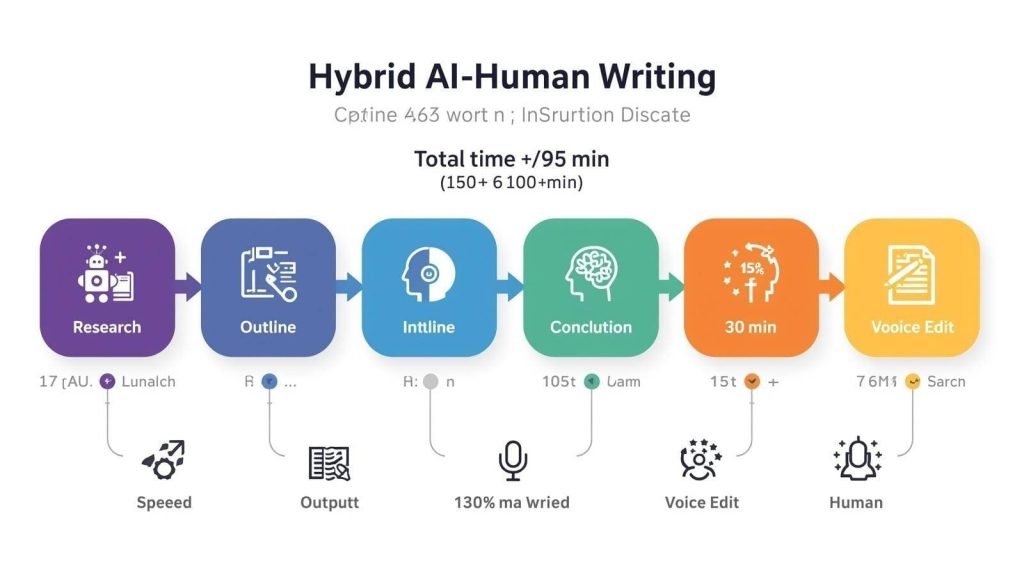
My current process balances AI efficiency with voice preservation:
- Research: ChatGPT gathers information, statistics, and expert perspectives (15 min)
- Outline: AI suggests structure, I reorganize based on storytelling flow (10 min)
- Intro: I write completely from scratch—this sets voice and hooks readers (15 min)
- Body: AI drafts paragraphs, I rewrite 40-50% and add personal examples (30 min)
- Conclusion: I write from scratch—this reinforces voice and main takeaway (10 min)
- Voice edit: Read aloud, inject personality, vary rhythm (15 min)
Total time: ~95 minutes for an 800-word article versus 150+ minutes writing manually. I save an hour while maintaining complete voice control where it matters most.
To learn how to maximize productivity while maintaining quality, see our article on using AI tools to 10x your productivity without replacing creativity.
When AI Actually Improves Your Voice
Counterintuitively, AI tools like Grammarly, ProWritingAid, and Wordtune can sharpen your voice by catching unconscious bad habits. They flag overused words, passive constructions, and unclear phrasing that muddy your message
QuillBot’s paraphrasing tool helps when you’re stuck on a sentence—seeing alternative phrasings often sparks better versions in your own voice. It’s like having a writing partner who suggests options without forcing solutions
The key is treating suggestions as options, not commands. Accept edits that align with your voice, ignore ones that don’t.
For a detailed comparison of these editing tools, check out our Grammarly vs ProWritingAid vs QuillBot review.
The Bottom Line
AI writing tools won’t erase your voice unless you let them. The freelancers losing clients to AI are those copying and pasting unedited outputs. The freelancers thriving are those using AI strategically for research, structure, and drafting while keeping voice, expertise, and personality firmly in human hands.
Your voice isn’t something you have—it’s something you actively maintain through editing choices, personal examples, and conscious style decisions. AI can speed up 60-70% of the writing process, but the final 30-40% that makes content yours requires human judgment.
Use AI as your research assistant and first-draft generator. Then write like yourself, edit ruthlessly, and deliver work that sounds like you wrote every word—because in the ways that matter, you did.
For more strategies and tool recommendations, refer back to our complete guide to AI writing tools for freelancers.

A.G. Makoudi is a tech writer specializing in SaaS tools and digital solutions, helping readers simplify technology and make smarter software choices.