

I’ll be honest—two years ago, I thought AI writing tools were just glorified autocomplete features. Then a client asked me to deliver five blog posts in three days, and I had no choice but to test what was out there. What I discovered changed how I work entirely.
AI writing tools aren’t about replacing writers. They’re about amplifying what we already do well—researching faster, drafting cleaner first versions, and spending more time on strategy instead of staring at blank screens. But with dozens of platforms launching every month, choosing the right ones for your freelance workflow can feel overwhelming.
After testing 27 tools over the past year on real client projects, I’ve learned which ones actually deliver value and which ones are just marketing hype. This guide breaks down everything you need to know to pick the tools that fit your niche, budget, and work style—whether you’re writing blog posts, ad copy, technical documentation, or social media content.
Why Freelance Writers Need AI Tools in 2026
The freelance writing market has shifted dramatically over the past three years. Clients expect faster turnarounds, tighter budgets, and more strategic content that ranks and converts. At the same time, competition has intensified—there are more freelancers than ever, and many are already using AI to work more efficiently.
According to recent industry data, 84% of freelancers now use AI tools in their workflow. This isn’t a trend—it’s the new baseline. Writers who resist these tools aren’t protecting their craft; they’re limiting their earning potential and burning out trying to compete on speed alone
AI writing tools level the playing field. They help you research topics in minutes instead of hours, generate multiple headline options instantly, and catch grammar mistakes before you hit send. For freelancers juggling multiple clients across different industries, these tools mean the difference between burnout and sustainable growth.
But here’s what most articles won’t tell you: not all AI tools are created equal, and more features don’t always mean better results. I’ve wasted hundreds of dollars on platforms that promised to revolutionize my workflow but ended up collecting digital dust. The key is knowing which tools solve real problems versus which ones add unnecessary complexity.
The Evolution of AI Writing: What Changed in 2025-2026
The AI writing landscape has matured significantly in the past 18 months. Early tools like Jasper and Copy.ai dominated in 2023-2024, but the market has since fragmented into specialized solutions that excel at specific tasks.
The biggest shift has been the rise of multimodal AI platforms that combine writing with research, SEO analysis, and even image generation. Tools like ChatGPT Plus and Claude Pro have become research powerhouses, while dedicated SEO platforms like Frase and Surfer have integrated AI writing directly into their optimization workflows.
Another major development: AI detection has become more sophisticated, which has forced tool developers to improve output quality. The robotic, repetitive content that plagued early AI tools is mostly gone. Modern platforms produce drafts that sound genuinely human—though they still require editing for accuracy, nuance, and brand voice alignment.
Price competition has also intensified. Where premium tools once charged $100+/month, new entrants like Rytr and Writesonic offer comparable features at $15-30/month. This has democratized access for freelancers who couldn’t justify expensive subscriptions when starting out
How I Tested These 27 Tools
I didn’t just sign up for free trials and skim features. Over twelve months, I used each tool for actual client work—blog posts, landing pages, email campaigns, case studies, product descriptions, and social media content across industries from SaaS to e-commerce to healthcare.
I tracked three core metrics for every tool: time saved per project (compared to writing manually), quality of output (measured by client feedback, revision requests, and my own editing time), and cost-effectiveness (whether the subscription paid for itself in saved hours or additional projects).
I also evaluated user experience factors like interface design, learning curve, customer support responsiveness, and integration with tools I already use like Google Docs and WordPress. A powerful AI engine means nothing if the platform is frustrating to use daily.
Some tools excelled at specific tasks but failed as all-in-one solutions. Others had impressive AI models but terrible user interfaces that slowed me down. A few stood out as genuine workflow game-changers that I now use multiple times per day.
The 7 Categories Every Freelancer Should Know
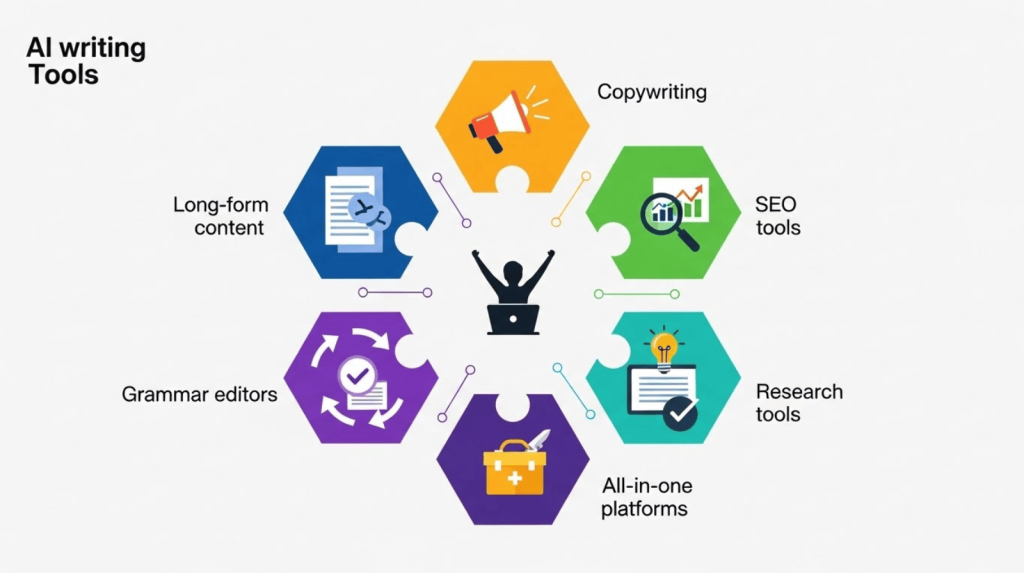
AI writing tools fall into distinct categories, and understanding these helps you build a strategic toolkit instead of wasting money on overlapping features or missing critical gaps.
Long-Form Content Generators
These platforms specialize in blog posts, articles, reports, and comprehensive guides—typically 1,000+ words. They include templates for different content types, tone controls, and often integrate with SEO tools. Best for freelancers who regularly produce in-depth content for blogs, thought leadership, or content marketing campaigns.
Copywriting Assistants
Focused on short-form, conversion-oriented content like ads, product descriptions, email subject lines, landing page headlines, and social media posts. These tools are optimized for generating multiple variations quickly and often include frameworks based on proven copywriting formulas like AIDA and PAS.
SEO Content Tools
These analyze top-ranking pages for target keywords, extract topical coverage gaps, suggest headings and questions to include, and score your content in real-time as you write. Essential if you write for clients who track organic traffic, measure ROI on content, or compete in saturated niches.
Grammar and Style Editors
Every freelancer needs at least one polish tool that catches typos, grammar errors, awkward phrasing, and tone inconsistencies. These range from basic checkers to advanced editors that analyze readability, suggest vocabulary improvements, and adapt to different writing styles.
Research and Ideation Tools
AI chat platforms that help you brainstorm topics, create outlines, gather background information, and answer research questions. These have become the first tools I open when starting any new project—they cut research time by 60-70% compared to manual Google searches and Wikipedia diving.
Paraphrasing and Humanizing Tools
These rewrite AI-generated or existing content to improve naturalness, avoid plagiarism, or bypass AI detection tools. They’re controversial but genuinely useful when you need to refine overly robotic drafts or adapt existing content for different audiences.
All-in-One Platforms
Bundles that combine multiple features—writing, design, social media scheduling, project management—into single subscriptions. Cost-effective for freelancers on tight budgets who need basic capabilities across several categories but don’t require best-in-class performance in any single area.
Top 27 AI Writing Tools: What Actually Works
After months of testing, here are the tools I recommend based on real freelance workflows. I’ve included current pricing, best use cases, and honest pros and cons for each.
Best for Long-Form Content
Jasper remains the most powerful long-form AI writer, with 50+ templates for blog posts, case studies, white papers, and reports. The Boss Mode editor includes commands like “write more,” “explain further,” or “give an example” that feel like directing a human assistant. It integrates seamlessly with Surfer SEO and offers brand voice customization that maintains consistency across projects
At $49/month for the Creator plan (100,000 words), it’s expensive but worth it if you write 10+ articles monthly or work with premium clients who expect polished, professional content. The Chrome extension also works in Google Docs and WordPress, which saves constant copying and pasting.
Writesonic delivers similar quality at a lower price point—$16/month for 100,000 words on the Individual plan. The interface is cleaner and more intuitive than Jasper’s, with less clutter and faster load times. The Chatsonic feature combines writing with real-time web search and image generation, which I use constantly for fact-checking recent data or creating supporting visuals
One advantage over Jasper: Writesonic includes AI article writer that can produce 1,500+ word drafts from just a title or outline. The quality requires editing, but it’s an excellent starting point that saves 2-3 hours per article.
Rytr is the budget champion at $9/month for 100,000 characters (roughly 20,000 words). Output quality isn’t as polished as premium tools—you’ll spend more time editing—but for freelancers starting out or working with clients who have tight budgets, it gets the job done. The use case library includes 40+ templates, and the built-in plagiarism checker is a nice bonus
Article Forge promises fully automated article generation, but in my testing it produced generic content that required heavy rewriting. At $27/month, it’s not worth the investment unless you’re creating high-volume, low-stakes content like directory listings.
Best for Copywriting and Ads
Copy.ai excels at generating ad copy, email sequences, product descriptions, and social media posts. The workflow is lightning-fast—input a few product details or campaign goals, and you get dozens of variations in seconds. The Pro plan ($49/month) includes unlimited words, which is essential for high-volume copywriters or agencies managing multiple clients.
I particularly love the campaign builder that generates complete email sequences or ad set variations with consistent messaging. This saves hours compared to creating each piece individually.
Anyword takes a data-driven approach with predictive performance scores that estimate which copy will convert best based on historical campaign data. For freelancers working with e-commerce clients or running paid ads, these insights are gold—they turn guesswork into strategy. Pricing starts at $49/month for the Starter plan with 30,000 words
The training library includes frameworks and formulas from top copywriters, which helps newer freelancers learn while they work. The interface is busier than Copy.ai’s, but the analytics depth makes up for it.
Closers Copy is tailored specifically for sales pages, VSLs (video sales letters), and email funnels. The templates follow proven direct response frameworks, and the community includes training from successful copywriters. At $79.99/month it’s pricey, but if you specialize in conversion copywriting for coaches, info products, or high-ticket offers, the ROI is strong
Simplified combines AI copywriting with graphic design, social media scheduling, and video editing for just $12/month. Quality doesn’t match specialized tools, but for freelancers creating content across multiple formats or managing full campaigns, the value is unbeatable
Best for SEO Content
Frase is my go-to for SEO research and content briefs. It analyzes the top 20 Google results for your target keyword, extracts the main topics and subtopics they cover, identifies questions people ask, and suggests headings and sections to include. At $15/month for the Solo plan (10 articles), it’s incredibly affordable.
The AI writer is decent but not the main attraction—Frase’s real value is the research automation. What used to take 60-90 minutes (manually analyzing competitor content) now takes 5 minutes. I create Frase briefs for every SEO project and share them with clients as content strategies.
Surfer SEO offers deeper optimization with real-time content scoring as you write. The editor analyzes your draft against top-ranking pages and recommends keyword usage, content length, heading structure, and semantic terms to include. The $89/month Hobby plan includes 30 articles, which works for most freelancers.
If your clients care about rankings and measure content performance in Google Analytics, this tool pays for itself. I’ve seen articles jump from page 3 to page 1 within weeks just by following Surfer’s recommendations.
Clearscope is enterprise-level at $170/month, which puts it out of reach for many freelancers. But if you work with high-paying clients or agencies, the keyword research depth and readability insights are unmatched. The content reports are also excellent for pitching strategies to new clients
Scalenut combines Frase-style research with Surfer-style optimization at a mid-tier price ($39/month for Growth plan with 30 articles). It’s less polished than either competitor but covers 80% of the functionality at 60% of the combined cost—ideal for freelancers who need both research and optimization in one tool
Best Grammar and Editing Tools
Grammarly Premium ($12/month annually) catches grammar, spelling, punctuation, tone, and clarity issues across every platform I write on—Google Docs, WordPress, Gmail, LinkedIn, and even Slack. The browser extension alone justifies the subscription.
The tone detector helps me adjust formality for different clients (casual for lifestyle brands vs. professional for B2B tech). The plagiarism checker scans 16 billion web pages, which gives me peace of mind before submitting client work. Premium also includes full-sentence rewrites and vocabulary suggestions that improve flow.
ProWritingAid offers more in-depth style reports than Grammarly—20+ different analyses covering repetitiveness, vague language, passive voice, sentence length variation, and more. At $10/month, it’s slightly cheaper with comparable grammar checking
The learning resources are excellent for improving your craft, not just fixing mistakes. I use ProWritingAid for long-form projects where I want detailed feedback, and Grammarly for everyday writing where I need quick, reliable checking.
Wordtune focuses specifically on rewriting sentences for better flow, clarity, and impact. I use it when I’m stuck on phrasing or need to quickly adjust tone from formal to conversational. The free plan is surprisingly generous (10 rewrites/day), and Premium ($9.99/month) adds unlimited rewrites plus tone adjustments.
The browser extension works in Gmail and LinkedIn, making it useful for client communication and networking, not just content creation.
Hemingway Editor isn’t AI-powered but deserves mention as a free companion tool. It highlights complex sentences, passive voice, and readability issues with color-coding. I run every piece through Hemingway after Grammarly to catch anything focused on clarity and conciseness.
Best Research and Ideation Tools
ChatGPT Plus ($20/month) has become essential infrastructure in my workflow. I use GPT-4 for brainstorming article ideas, creating detailed outlines, researching unfamiliar topics, generating interview questions, and even debugging my own writing when something feels off but I can’t identify why.
The context window handles up to 8,000 words, which means I can paste entire articles for analysis or feed it multiple client briefs to identify content gaps. The quality of responses has improved dramatically since GPT-3.5—it understands nuance, follows complex instructions, and rarely produces the generic fluff that plagued earlier versions.
Claude Pro ($20/month) handles even longer inputs—up to 100,000 tokens, roughly 75,000 words. This makes it superior for analyzing lengthy documents, comparing multiple sources, or creating comprehensive outlines for pillar content. The responses are more measured and less prone to the confident hallucinations that sometimes plague ChatGPT
I prefer Claude for complex research projects where accuracy matters more than creativity, and ChatGPT for ideation and brainstorming where I want unexpected angles and creative connections.
Perplexity Pro ($20/month) combines AI chat with real-time web search and automatic citations. When I need current information—industry trends, recent statistics, news events—or want sources I can verify and link to in articles, Perplexity is faster and more reliable than manually searching Google then prompting ChatGPT with URLs
The citations alone make it worth the cost. I can deliver fact-checked drafts to clients with embedded sources, which builds trust and reduces revision rounds.
ChatSonic (included with Writesonic) offers similar real-time search capabilities and adds AI image generation and voice commands. The quality doesn’t quite match Perplexity’s research depth, but the integrated writing tools make it efficient for creating content start-to-finish without switching platforms.
Best Paraphrasing and Rewriting Tools
QuillBot is the industry standard for paraphrasing, with seven rewriting modes ranging from simple synonym swapping to complete restructuring. The free version handles 125 words at a time, but Premium ($8.33/month annually) unlocks unlimited length and faster processing.
I use QuillBot to refine AI drafts that sound repetitive, adapt existing content for different audiences, or work around awkward phrasing when I’m stuck. The summarizer and citation generator tools are useful bonuses.
Undetectable AI specifically rewrites AI content to pass detection tools like Originality.ai and GPTZero. At $9.99/month it’s controversial—some see it as deceptive, others as essential for protecting work from false positives. My take: use it sparingly and always edit output manually to ensure accuracy and voice consistency
The tool has legitimate uses (refining Claude or ChatGPT research into your own voice, avoiding false plagiarism flags), but relying on it to mask low-effort AI content is short-sighted. Clients can tell the difference between thoughtful writing and automated output, detection tools aside.
Wordtune Read analyzes and summarizes long documents, research papers, and articles—saving hours when you need to digest source material quickly. The free version works well, and it’s included with Wordtune Premium subscriptions.
Best All-in-One Platforms
Simplified bundles AI writing, graphic design, social media scheduling, and video editing for $12/month. For freelancers managing content across multiple formats—blog posts, Instagram graphics, LinkedIn posts, YouTube thumbnails—the value is extraordinary
Writing quality is decent but not best-in-class. Design tools rival Canva’s basics. Social scheduling covers major platforms with bulk upload. Nothing is exceptional, but everything is good enough, and the unified workflow saves time compared to juggling five separate tools.
Narrato Workspace combines AI writing with project management, collaboration, and workflow automation. At $45/month for teams it’s expensive for solo freelancers, but if you work with other writers, manage client projects end-to-end, or run a content agency, the collaboration features justify the cost
The AI assistance is woven throughout—content briefs, drafting, optimization, and even automated quality checks before delivery.
Writecream offers AI writing, image generation, voiceovers, and chatbot creation in one platform. The $29/month Unlimited plan is cost-effective for freelancers creating multimedia content or working with clients who need videos, podcasts, or presentations alongside written content
ContentBot has strong AI models and over 110 content types, but the interface feels dated and outputs often miss the mark on tone. At $29/month it’s competitively priced, but I’d recommend Writesonic or Rytr instead for better user experience
Tools I Tested But Don’t Recommend
Not every tool made the cut. Article Forge generates content quickly but lacks coherence—articles feel like keyword-stuffed collections of facts rather than cohesive narratives. At $27/month, the editing time required negates any speed advantages.
Kafkai produced the most generic, repetitive content I tested. Every article sounded the same regardless of topic or settings. The $29/month price might attract budget-conscious freelancers, but the output is essentially unusable without complete rewrites.
Hypotenuse AI has solid features but couldn’t differentiate itself from cheaper alternatives like Writesonic. At $29/month for 35,000 words, the value proposition isn’t strong enough.
Copysmith targets e-commerce but the product description quality didn’t match specialized tools like Anyword or even general tools like Copy.ai. The $19/month Starter plan is affordable, but I’d invest those dollars elsewhere.
How to Choose the Right Tools for Your Workflow
Start by identifying your biggest time sinks and pain points. Track where you spend the most time over the next week—is it researching topics, drafting, editing, SEO optimization, or creating variations of short-form content?
If research consumes hours, invest in Frase, Perplexity, or ChatGPT Plus. If editing takes forever, Grammarly or ProWritingAid will deliver immediate returns. If you’re drowning in short-form requests (ads, social posts, emails), Copy.ai is worth every dollar.
Don’t subscribe to everything at once. I recommend starting with three tools: one for research (ChatGPT or Claude), one for editing (Grammarly), and one specialized tool based on your niche (Jasper for long-form, Copy.ai for ads, or Frase for SEO).
Test free trials aggressively. Most tools offer 7-14 day trials—use them for real client work, not just demo content. Track time saved, output quality, and client feedback, then decide if the subscription cost justifies the results.
Consider integration with your existing workflow. If you write in Google Docs, tools with Chrome extensions (Grammarly, Jasper, Wordtune) save constant copying and pasting. If you publish in WordPress, look for direct integrations (Jasper, Frase, Surfer).
Budget strategically. A $100/month tool investment should save you at least 8-10 hours monthly (assuming $50-100/hour freelance rates). If a tool doesn’t clear that bar, it’s not cost-effective no matter how impressive the features.
Building Your AI Writing Stack: Three Budget Tiers
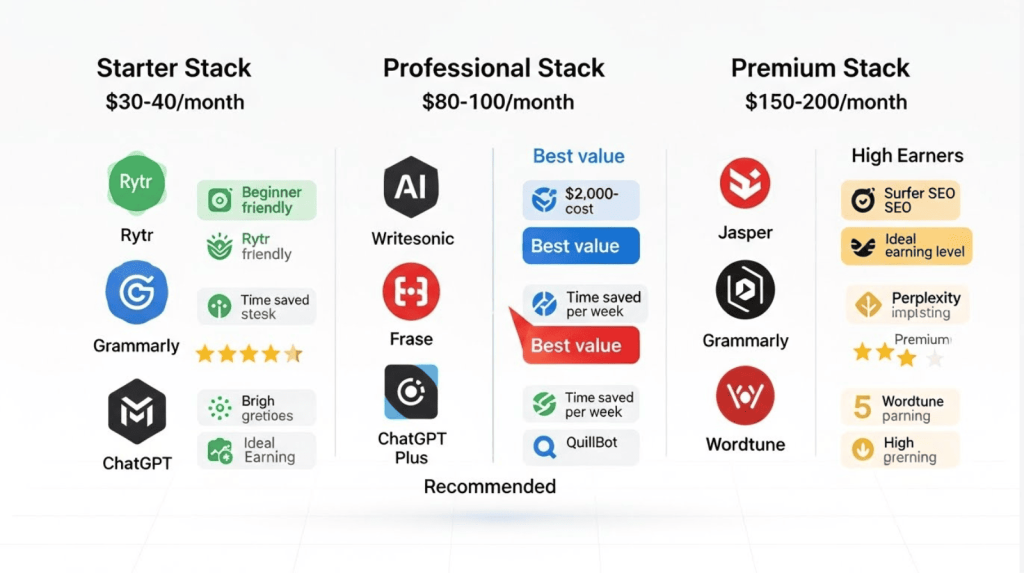
Starter Stack ($30-40/month): Rytr ($9) for writing, Grammarly free or Premium ($12), ChatGPT free or Plus ($20). Total: $9-41/month depending on needs.
Professional Stack ($80-100/month): Writesonic ($16-30), Grammarly Premium ($12), Frase ($15), ChatGPT Plus ($20), QuillBot Premium ($8). Total: $71-85/month.
Premium Stack ($150-200/month): Jasper ($49), Surfer SEO ($89), Grammarly Premium ($12), Perplexity Pro ($20), Wordtune Premium ($10). Total: $180/month.
Most freelancers find the Professional Stack offers the best balance of capability and affordability. The Premium Stack makes sense once you’re earning $5,000+/month from writing and can justify the investment.
The Ethics of AI in Freelance Writing
Here’s the uncomfortable truth: clients care about results, not process. They want engaging content that ranks, converts, and sounds professional—whether you used AI tools, hired ghostwriters, or banged it out at 3am fueled by coffee and panic.
That said, transparency matters. I disclose AI tool usage when clients ask, but I frame it accurately: “I use AI for research and first drafts, then extensively edit and fact-check to ensure accuracy and voice consistency.” This is no different from using spell check, grammar tools, or hiring an editor—it’s augmentation, not replacement.
The real ethical line is quality and accuracy. Publishing AI-generated content without verification, fact-checking, or editing is irresponsible. Passing off completely automated content as original writing is deceptive. Using AI to research faster, overcome writer’s block, or polish phrasing is smart business.
The Future of AI Writing Tools
The tools reviewed here represent early 2026, but this space evolves monthly. We’re already seeing AI models that understand brand voice after analyzing just 3-5 sample articles, tools that automatically optimize content for voice search and featured snippets, and platforms that can generate, publish, and promote content with minimal human intervention.
The freelancers who thrive won’t be those who resist AI or those who blindly automate everything. Success belongs to writers who strategically integrate these tools to deliver better work faster while maintaining the creativity, judgment, and expertise that clients truly value.

The Bottom Line
AI writing tools won’t replace skilled freelancers, but they’ve permanently changed how we work and what clients expect. The writers thriving in 2026 aren’t fighting AI—they’re using it strategically to deliver better work faster, take on more clients without burning out, and focus on high-value tasks like strategy and client relationships.
After testing 27 tools over twelve months, my daily stack includes ChatGPT Plus for research and ideation, Grammarly Premium for editing, and Frase for SEO content briefs. Depending on the project, I’ll add Jasper for long-form articles or Copy.ai for ad campaigns. This combination costs about $100/month but saves me 10-15 hours weekly, which translates to $2,000-4,000 in additional monthly earnings.
The key is treating AI as an assistant, not a replacement. The tools handle research, first drafts, and polish—the repetitive, time-consuming tasks that drain creative energy. This frees you to focus on strategy, storytelling, voice, and client relationships—the irreplaceable human elements that actually set you apart as a freelancer and justify premium rates.
Start with one tool. Master it. Add another when you’ve maximized the first. Build your stack intentionally based on your actual workflow, not feature lists or marketing hype. And always remember: the best AI writing tool is the one that makes you a better writer, not one that writes for you.

A.G. Makoudi is a tech writer specializing in SaaS tools and digital solutions, helping readers simplify technology and make smarter software choices.

Honestly this guide saved me so much time ive been testing different ai tools for months now and kept switching between them but your comparison here makes everything clear especially the part about chatgpt and frase i use them daily too and they really cut down research time by like half at least the budget breakdown is super helpful because i was spending way too much on tools i barely used quick question though have you tried using jasper with the surfer integration or do you keep them separate im trying to figure out the best workflow without jumping between too many platforms anyway thanks for the real world testing most reviews just repeat the marketing stuff but you actually used these tools on client work and it shows
JEMES Thanks so much for the detailed feedback.
I’m really glad the comparison helped simplify your workflow and reduce unnecessary tool costs. ChatGPT and Frase are a strong combination for speeding up research and building better content briefs.
Regarding Jasper and Surfer, I’d keep the workflow simple rather than adding more tools just for the sake of it. The previous Jasper–Surfer integration is no longer available, so the practical approach is to use one tool for drafting and brand voice, then move the final draft into Surfer for on-page optimization.
My recommendation is: research the topic and search intent first, create a clear outline, write the first draft in your preferred AI writer, then use Surfer near the end to refine headings, topical coverage, and keyword placement. Finally, do a human edit to make sure the article stays accurate, useful, and natural. That way, you avoid constantly switching platforms while still getting the benefits of both tools.