A freelance content strategist shared her workflow with me last month: she now delivers complete video campaigns—from concept to 30 published clips—in a single afternoon. Two years ago, that same output would’ve required a production team and a week of work.
The difference isn’t just the tools—it’s having a systematic workflow that turns AI video creation from chaotic experimentation into predictable production. Freelancers who master this workflow can charge premium rates while delivering faster than competitors still stuck in manual editing.youtube
This is the complete AI video workflow that busy freelancers are using to scale their video services in 2025.
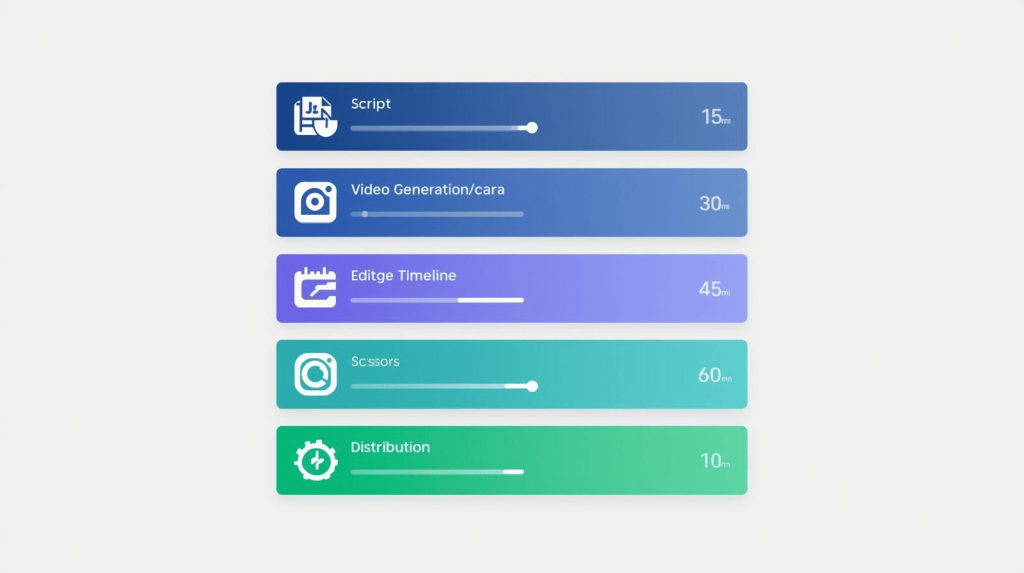
The 5-Stage AI Video Workflow
After analyzing workflows from dozens of successful video freelancers, five stages consistently appear
- Ideation & Scripting (15 minutes)
- Visual Generation (30 minutes)
- Video Assembly & Editing (45 minutes)
- Optimization & Repurposing (20 minutes)
- Distribution & Scheduling (10 minutes)
Total time investment: 2 hours for a complete video campaign
Stage 1: Ideation & Scripting (15 Minutes)
AI has eliminated blank-page paralysis. Here’s the fastest path from idea to script
Tool stack: ChatGPT, Claude, or Gemini for script generation.youtube
The process:
- Feed the AI your topic, target audience, and platform (TikTok, YouTube, LinkedIn)
- Request 5 hook variations and let AI suggest the strongest opener
- Generate a structured script with timestamps for easy video segmentation
- Export as formatted document for next stage
Pro tip: Include “viral video structure” in your prompt—AI models are trained on high-performing content patterns and will mirror successful formats
Stage 2: Visual Generation (30 Minutes)
This is where AI delivers the most dramatic time savings. Traditional video production required cameras, lighting, locations, and actors. AI video generators eliminate all of that
Tool stack: Runway Gen-3, Google Veo, Luma Dream Machine for text-to-video; Midjourney + Runway for image-to-video workflow
The process:
- For talking head content: Use HeyGen or Synthesia to generate AI avatars speaking your script (10 minutes)
- For cinematic B-roll: Input scene descriptions into Runway or Veo, generate 3-5 variations per scene (15 minutes)youtube
- For image-to-video: Create still frames in Midjourney, animate them in Runway for controlled motion (20 minutes)youtube
Batch generation strategy: Generate all visual assets at once rather than sequentially—AI rendering happens in parallel, saving significant time
Stage 3: Video Assembly & Editing (45 Minutes)
Raw AI footage needs polish. This stage transforms disconnected clips into cohesive narratives
Tool stack: Descript for transcript-based editing, CapCut for effects and transitions, Premiere Pro for advanced control
The process:
- Import all generated clips into your editing platform
- Use Descript’s text-editing feature to cut and arrange footage by editing the transcript (20 minutes)youtube
- Remove filler words (“um,” “uh”) automatically with AI cleanup tools (5 minutes)
- Add AI-generated B-roll between talking segments for visual variety (10 minutes)
- Layer background music from AI music generators like Suno or Soundraw (5 minutes)
- Generate and sync captions automatically (5 minutes)
The key insight: Edit for pacing, not perfection. Social video thrives on energy, not polish
Stage 4: Optimization & Repurposing (20 Minutes)
One video becomes 20+ assets in this stage. This is where freelancers multiply their value
Tool stack: OpusClip or Vidyo.ai for automatic clip generation, CapCut for platform-specific formatting
The process:
- Upload your master video to OpusClip or similar repurposing tool (2 minutes)
- AI scans for 20-30 shareable moments and generates vertical clips automatically (10 minutes)
- Review AI virality scores and select top 10-15 clips (5 minutes)
- Export in platform-optimized formats: 9:16 for TikTok/Reels, 1:1 for LinkedIn, 16:9 for YouTube (3 minutes)
Strategic layer: Create 2-3 variations of your best clips with different hooks—same content, different opening lines to A/B test performance
Stage 5: Distribution & Scheduling (10 Minutes)
The final stage ensures consistent publishing without manual posting
Tool stack: Buffer, Hootsuite, or platform-native schedulers
The process:
- Upload clips to your scheduling tool in batch (3 minutes)
- Set staggered posting times across platforms (avoid simultaneous posts—spread throughout the day/week) (5 minutes)
- Write platform-specific captions with AI assistance (2 minutes)
Pro tip: Schedule your best-performing clips (based on OpusClip virality scores) during peak engagement hours for each platform
The Complete Tool Stack (Budget vs. Premium)
| Stage | Budget Option | Premium Option |
|---|---|---|
| Scripting | ChatGPT Free | Claude Pro ($20/month) |
| Visual Generation | Luma Free Tier | Runway Pro ($28/month) |
| Editing | CapCut (Free) | Descript ($12/month) |
| Repurposing | OpusClip ($9/month) | Vidyo.ai ($20/month) |
| Scheduling | Buffer Free | Hootsuite Pro ($99/month) |
| Total Monthly Cost | $9 | $179 |
Most freelancers find the sweet spot at $50-80/month by mixing budget and premium tools strategically.youtube
The Freelancer’s Competitive Advantage
The freelancers winning video contracts in 2025 aren’t competing on production quality—they’re competing on speed, volume, and strategic distribution
A systematic AI workflow lets you:
- Deliver 30+ video assets in the time competitors deliver 3
- Charge premium rates for “complete video campaigns” instead of single videosyoutube
- Test and iterate faster, identifying winning content patterns in days instead of months
The shift: You’re no longer selling video production—you’re selling content multiplication and strategic distribution.
Start Simple, Scale Smart
Don’t try to master every tool simultaneously. Start with this minimal workflow:youtube
- Script with ChatGPT
- Generate with Runway or Luma
- Edit with CapCut
- Repurpose with OpusClip
- Schedule manually until volume justifies automation
As client revenue grows, upgrade tools incrementally.youtube
The 2-Hour Challenge
Try this workflow once. Take a client brief (or personal project) and force yourself through all five stages in 120 minutes. The first attempt will feel rushed. By the third, it becomes natural. By the tenth, you’ll wonder how you ever worked any other way
The AI video revolution isn’t coming—it’s here. The only question is whether you’re building the workflow that takes advantage of it
Ready to master the tools? Start with our guide on AI Video Tools for Freelancers to build your complete system.

A.G. Makoudi is a tech writer specializing in SaaS tools and digital solutions, helping readers simplify technology and make smarter software choices.